

Create a compile file
A compile file (a .f file) lists the source files of a design and their include directories, in the order a
simulator or compiler reads them. Three things use it: the plugin, to evaluate `ifdefs (see
Conditional compilation);
slang, the compiler behind the plugin’s compiler checks, which compiles it; and the
run configurations, which pass it to Verilator or Icarus Verilog. A project often has none, or none for
the top you want to simulate, and writing one by hand means finding every file the top needs and putting packages
before the files that use them. Create Compile File… does that for you: you pick a top module, the module you would
simulate or compile (usually one nothing else instantiates, such as a testbench), and the plugin writes the files it
needs, in an order that compiles.
Try it
Section titled “Try it”Open the sample project with File | Open… and wait until the progress bar at
the bottom right of the IDE (indexing) has finished. The sample’s sim.f lists the design but not its testbench
tb/sim_tb.sv; here you make a compile file for the testbench. The steps add one file, which the last step deletes;
to start over, unzip the sample project again.
-
Open the testbench. Open
tb/sim_tb.sv(in the Project tool window, or Navigate | File, ⇧⌘O / Ctrl+Shift+N) and click anywhere betweenmodule sim_tb;andendmodule, so that the text cursor (the caret) is in the module. -
Open the dialog. Choose Tools | Create Compile File… (it is also in the editor’s right-click menu). The Create Compile File dialog opens:
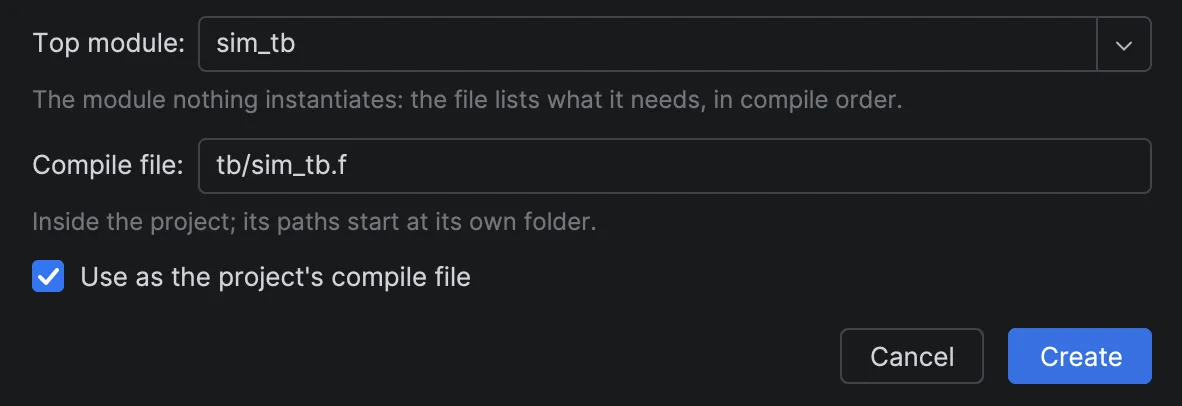
It offers:
- Top module:
sim_tbfirst (the module at the caret); the list holds the project’s modules that nothing instantiates.topis not among them, becausesim_tbinstantiates it. You can also type any module, interface or program; a typed name gets<name>.fin the project folder, which you can change. - Compile file: the path from the project folder,
tb/sim_tb.f, next to the top’s file. - Use as the project’s compile file: checked. Uncheck it, so that deleting the new file in step 4 puts the sample back as it was (checked, it would also change the settings).
Click Create.
- Top module:
-
Read the file.
tb/sim_tb.fopens in the editor. After a comment that starts// Compile file for top 'sim_tb', made by SystemVerilog Studio, it lists:+incdir+../rtl../rtl/counter_pkg.sv../rtl/counter.sv../rtl/top.svsim_tb.svThese are the design files of
sim.fplus the testbench, with paths that start at the compile file’s own folder,tb/. The packagecounter_pkgcomes first becausecounterimports it, and+incdir+../rtlis there becausetop.svincludesdefines.svhfromrtl/. A notification Compile file tb/sim_tb.f created says4 files for top 'sim_tb'. sim.f was the project's compile file as its only .f; with two .f files neither is used: choose one in Settings | Languages & Frameworks | SystemVerilog.That is the price of unchecking Use as the project’s compile file here: until the next step deletes the new file, the project has no compile file. -
Clean up. Delete
tb/sim_tb.f(right-click it in the Project tool window, Delete). With two.ffiles in the project,sim.fis no longer chosen automatically, and the other pages’ steps expect it. If you left Use as the project’s compile file checked, also open Settings | Languages & Frameworks | SystemVerilog and clear Compile file (.f), so thatsim.fis chosen automatically again.
How it works
Section titled “How it works”The file holds what the top needs, found from the top’s code:
| The top’s files use | The compile file gets |
|---|---|
| An instance of a module, interface, program, checker or primitive | Its file (and, in turn, what that file needs) |
A port of an interface type (bus_if.host b) |
The interface’s file |
import pkg::*; or pkg::name |
The package’s file, before the files that use it |
`include "x.svh" |
+incdir+ for the folder that makes the include resolve; the header itself is not listed |
A macro defined in a file that the using file does not `include (for example a defines file that a hand-written .f lists first) |
That file, before the files that use the macro |
A bind (which inserts a module, usually a checker, into another without editing it) written in one of these files |
The bound module’s file |
-
Order:
- files that hold only
`defines; - packages, each after the packages it imports;
- other files whose macros the design uses;
- everything else, by path.
The tools read the files as one stream, so a macro or package from an earlier file is known in later ones.
- files that hold only
-
Paths start at the compile file’s own folder (
../rtl/top.svfromtb/). -
A name defined in several files: the plugin takes one by these rules, in order:
- the file the current compile file lists (as a source, or in one of its
-ylibrary folders, which the tools search for missing modules); - a file in a folder already chosen for another name;
- the file nearest the top.
If none of these decides, the first by path is taken and the notification says
… is defined in several files and nothing told them apart: the first was taken. - the file the current compile file lists (as a source, or in one of its
-
A name defined nowhere: the notification lists it after
Defined nowhere:; add its file by hand. -
Defines: the new file has no
+define+lines. When the design uses macros the current compile file defines, the notification saysThe design uses macros the current compile file defines (…): add them to Extra defines in Settings | Languages & Frameworks | SystemVerilog before you use the new file. If Use as the project’s compile file was checked, the new file is already in use and the sentence ends(they no longer apply).: add them now. -
Files that need each other first (a package using a macro of a module file that imports the package): the notification says
Some files need each other compiled first (…): no order compiles them all. -
Use as the project’s compile file: the file becomes the compile file in Settings | Languages & Frameworks | SystemVerilog, evaluating
`ifdefis switched on, and a Working directory set there is cleared (the file’s paths start at its own folder); the notification says what changed. Unchecked, it is used anyway when it is the project’s only.ffile and the settings choose one automatically (evaluating`ifdefon, Compile file (.f) empty, When empty, use the project’s only .f file checked); the notification says so. If a Working directory is set then, the notification says to clear it, because the file’s paths start at its own folder. Unchecked when the project had exactly one.f(used automatically), it now has two, so neither is used: the notification names the old one, as in step 3 of Try it. A file in an excluded folder does not count as one of the project’s.ffiles.
The dialog checks the choice before writing, and says what is wrong under the field:
| You enter | The dialog says |
|---|---|
| No top | Choose the top module |
| A name no module has | No module, interface or program named '…' |
A file name without .f |
The name must end in .f |
| A file that exists | … exists: choose another name |
| A path outside the project | The compile file must be inside the project |
Other places to create one
Section titled “Other places to create one”- Settings | Languages & Frameworks | SystemVerilog: Create from a Top Module… next to Compile file (.f).
The new file is written at once and fills the field, Working directory is cleared and evaluating
`ifdefis checked; click Apply to use it. On Cancel the file stays: it is used only if it is the project’s only.f, and a.fthe project used automatically before is not used any more (there are two); the notification says which. - The Design Hierarchy tool window, when the project has no compile file: Create compile file… at the end of
the line above the tree, or in the empty tree. (With evaluating
`ifdefoff, the link is Compile file settings… instead: a compile file that is set is not read then, and a new one would not fix that.) - Coding agents: the
sv_create_compile_filetool (see Coding agents).
If it doesn’t work
Section titled “If it doesn’t work”| You see | Likely cause | What to do |
|---|---|---|
| Tools | Create Compile File… is grey | The IDE is still indexing | Wait until the progress bar at the bottom right is gone |
Wait until indexing finishes, then create the compile file. (from the settings page or the Design Hierarchy link) |
The IDE is still indexing | Wait until the progress bar at the bottom right is gone, then click again |
| Top module is not the module you were in | The caret was not inside a module | Choose it in the list, or type its name |
| The module you want is not in the Top module list | Another module of the project instantiates it | Type its name: any module can be the top |
… is defined in several files and nothing told them apart |
Copies of a module (for example vendor and generic versions) | Check which file the compile file lists; edit it, or make it with sv_create_compile_file and its prefer folders |
Defined nowhere: … |
The file that defines it is not in the project | Add the file to the compile file by hand, or -y <folder>, which tells the tools to look for missing modules in that folder |
… exists: choose another name |
A file of that name is already there | Choose another name, or delete the old file first |
See also Troubleshooting.
Limitations
Section titled “Limitations”- The dialog cannot say which of several definitions to prefer;
sv_create_compile_filecan (prefer). - A
bindin a file outside the design (a testbench or formal file binding into it) is not taken; the notification names those files. - Only
.sv,.svhand.vfiles are searched.
More in Known limitations.
Related
Section titled “Related”- Conditional compilation: how the compile file decides which code is active.
- Run configurations: pass the compile file to Verilator or Icarus Verilog.
- Design hierarchy: the design the compile file describes.