Icarus Verilog
Icarus Verilog is a free, event-driven Verilog and SystemVerilog simulator:
iverilog compiles the design into a file that its runtime, vvp, then simulates. It starts quickly and needs no C++
compiler, which makes it handy for small testbenches. An Icarus Verilog run configuration (a named set of settings
you start with the Run button; see Run configurations) checks the design
(Lint), compiles it (Build), or compiles and simulates it (Build and run). Its messages appear in the Run
tool window at the bottom of the IDE, with each file:line as a link to the source.
Try it
Section titled “Try it”You need Icarus Verilog on your PATH (check with iverilog -V in a terminal; to install it, use
brew install icarus-verilog on macOS or sudo apt install iverilog on Debian or Ubuntu). Open the
sample project with File | Open… and wait until the progress bar at the bottom
right of the IDE (indexing) has finished. You check the design, then simulate the sample’s testbench,
tb/sim_tb.sv: it clocks and resets the design’s top module top, waits until the counter inside is done, prints a
PASS line and records the waves. The steps change no source file; the run writes sim.vvp and a waveform file into
the project folder. On a laptop, function keys such as Shift+F10 may need Fn. To start over, unzip the
sample project again.
-
Create a configuration. Choose Run | Edit Configurations…, click +, choose SystemVerilog Studio | Icarus Verilog, type
icarusin Name and click OK. The Action is Lint, and Compile file (.f) is empty, so the project’s compile file is used: the.ffile that lists the design’s sources, heresim.fin the project root, found automatically because it is the project’s only.ffile (see how the compile file is chosen). -
Check the design. Select
icarusin the run-configuration drop-down in the top toolbar and click the green Run triangle (⌃R on macOS, Shift+F10 on Windows/Linux). The Run tool window shows the command line,…/iverilog -g2012 -t null -f …/sim.f(…stands for the full paths on your machine), and the exit code 0: Icarus prints nothing else when the design has no error. -
Set up the simulation. Open the configuration again (Run | Edit Configurations…) and set:
- Action: Build and run.
- Top module:
sim_tb, the testbench, which instantiatestop. - Icarus Verilog options:
tb/sim_tb.sv. The testbench is not in the compile filesim.f, which lists only the design, so you add it here.
Click OK.
-
Run it and read the result. Click Run again. The Run tool window shows the compile,
…/iverilog -g2012 -o sim.vvp -s sim_tb -f …/sim.f tb/sim_tb.sv, then the simulation, a command line ending invvp -n sim.vvp, which printsxandRTL simulation(both fromtop: thexisg_lane[0].busy, a signal the sample never assigns, so its value is unknown,x; this is expected),VCD info: dumpfile sim_tb.vcd opened for output.,PASS: the counter is done at 225000(the time in picoseconds) andtb/sim_tb.sv:18: $finish called at 245000 (1ps). The last line isProcess finished with exit code 0.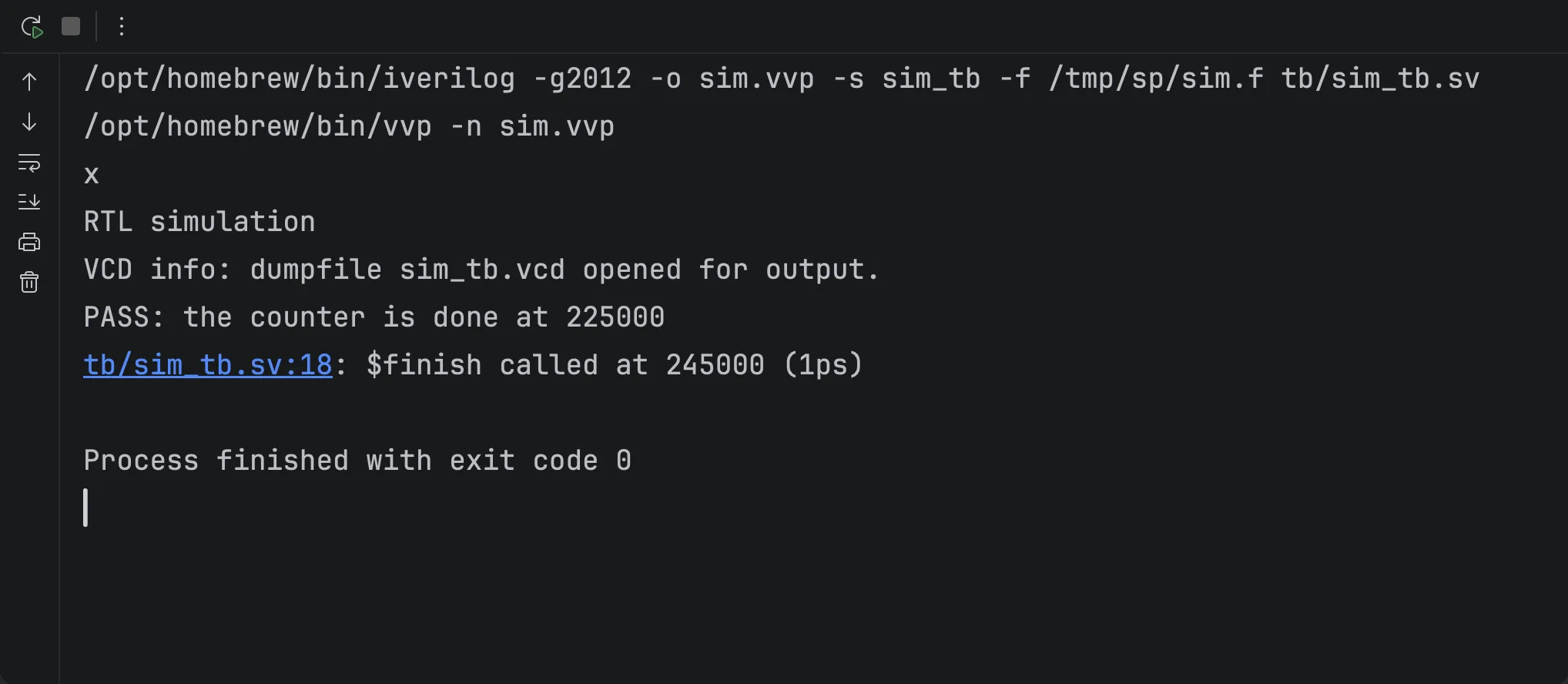
-
Jump to the testbench. Click
tb/sim_tb.sv:18in the$finishline:tb/sim_tb.svopens at the line#20 $finish;(the testbench stops 20 ns after the PASS line, so the waves show the end). The waves are insim_tb.vcdin the project folder: open them with the Waveform viewer (if you go on to that page, keep the file for now). When you are done, deletesim.vvpandsim_tb.vcd(right-click them in the Project tool window, Delete; if they do not show yet, choose File | Reload All from Disk), and remove the configuration: select it in Run | Edit Configurations… and click the minus button.
How it works
Section titled “How it works”The configuration runs iverilog on a compile file: a .f file with the list of sources and the +incdir+ and
+define+ options you would also give Icarus on the command line, passed with -f. With Compile file (.f) empty,
it is the project’s compile file, as chosen in Settings | Languages & Frameworks | SystemVerilog (see
Conditional compilation).
Each action runs iverilog in the working directory with these arguments, in this order: the action’s own options;
the Extra defines of the SystemVerilog settings as -DNAME[=value]; Top module as -s; -f and the compile file; then your Icarus Verilog options.
Step 4’s command line is an example.
| Action | Runs |
|---|---|
| Lint | iverilog -g2012 -t null [-D…] [-s …] -f sim.f [Options]: compiles and writes nothing |
| Build | iverilog -g2012 -o sim.vvp [-D…] [-s …] -f sim.f [Options] |
| Build and run | the build, then vvp -n sim.vvp with the Simulation arguments |
- SystemVerilog 2012 (
-g2012) unless Icarus Verilog options choose another language generation, for example-g2005-sv: the last-gwins. - Options come after the compile file, so a testbench file written there is compiled after the design. A file the
design itself needs first (a package, a header of macros) belongs in the compile file. Write options before file
names in Icarus Verilog options (
-DSEED=1 tb/sim_tb.sv): on macOS,iverilogreads no option after a file name. - The simulation runs only if the build succeeds.
vvpis taken from the folder ofiverilog, else from the PATH. With-n, Stop and$stopend the simulation instead of waiting at vvp’s interactive prompt.
Settings
Section titled “Settings”Open the configuration with Run | Edit Configurations… and select it in the list on the left.
| Setting | Meaning |
|---|---|
| Icarus Verilog executable | Empty: iverilog on the PATH. A path (a relative one starts at the project directory) or a name to look up on the PATH. |
| Action | Lint, Build or Build and run. |
| Compile file (.f) | Empty: the project’s compile file. The file must be on the local disk. |
| Working directory | Where iverilog and vvp run, where the relative paths in the compile file start, and where sim.vvp and the waves are written. Empty: the Working directory set next to the project’s compile file in the SystemVerilog settings; if that is empty too (as in the sample project), the folder that holds the .f file. |
| Top module | -s. Empty: Icarus finds the top. |
| Icarus Verilog options | More options for iverilog, e.g. -Wall, or a testbench file. |
| Simulation arguments | For Build and run: passed to vvp after sim.vvp, e.g. +seed=1. |
If it doesn’t work
Section titled “If it doesn’t work”| You see | Likely cause | What to do |
|---|---|---|
Unable to find the root module "sim_tb" and no simulation |
The file that defines the top module is in neither the compile file nor Icarus Verilog options, or Top module is misspelled | Add the file to Icarus Verilog options (tb/sim_tb.sv), or correct Top module; leave it empty for the design’s own top |
The dialog says vvp was not found next to … or on the PATH |
vvp is not installed with iverilog |
Install Icarus Verilog completely, or put vvp on the PATH |
-Wall: No such file or directory (or another option’s name) |
On macOS, iverilog reads no option after a file name in Icarus Verilog options (tb/sim_tb.sv -Wall) |
Write the options first, then the file names (-Wall tb/sim_tb.sv) |
The dialog says iverilog is not found, although it works in a terminal |
The IDE does not have your shell’s PATH | See Run configurations: If it doesn’t work |
See also Troubleshooting.
Limitations
Section titled “Limitations”- Run only: the configurations cannot be debugged.
- Tested on macOS and Linux; Windows is untested.
More in Known limitations: Run configurations.
Related
Section titled “Related”- Run configurations: the Run tool window, clickable locations, stopping a run.
- Verilator: the same testbench with Verilator.
- Waveform viewer: open
sim_tb.vcd.