Syntax highlighting
SystemVerilog Studio colors code in two layers:
- Tokens: keywords, numbers, strings, comments, operators, system tasks and macros are colored as you type.
- Names: every name is colored by what it is (a module, a port, a parameter, a class property, …). The plugin works this out with the same name resolution as Go to Declaration, so a port and a local variable get different colors even though they look alike. Name colors appear a moment after you stop typing, like other code analysis in the IDE.
Keywords
Section titled “Keywords”| Group | Examples |
|---|---|
| Design unit | module, endmodule, interface, program, package, class, endclass, checker, primitive, … (wherever the keyword appears, e.g. also in virtual interface and typedef class) |
| Declaration | function, endfunction, task, typedef, parameter, import, extends, nettype |
| Control flow | if, else, case, for, foreach, begin, end, fork, join, return, wait, unique0 |
| Data type | logic, bit, int, real, string, reg, wire, uwire, signed |
| Direction and modifier | input, output, inout, ref, virtual, rand, soft, local, static, automatic |
| Process | always_ff, always_comb, initial, final, assign, posedge, negedge |
| Other keywords | every other IEEE 1800-2017 keyword, for example this, super, null, new, std, and property operators such as until and implies |
System tasks and functions ($display, $clog2, $urandom, any $name), macros and compiler directives
(`define, `uvm_info, and `timescale 1ns/1ps, `default_nettype none, `resetall,
`celldefine, `pragma, … with their arguments, up to a trailing comment), strings, numbers (8'h10, 3.14, '0), operators (==, <=, ? :, ::,
@, #, ##, ++, +:, …), comments and attributes ((* keep = "true" *), Attribute) have their own colors.
The code of an inactive `ifdef branch is greyed out (Inactive code, see
Conditional compilation).
| Color group | Examples |
|---|---|
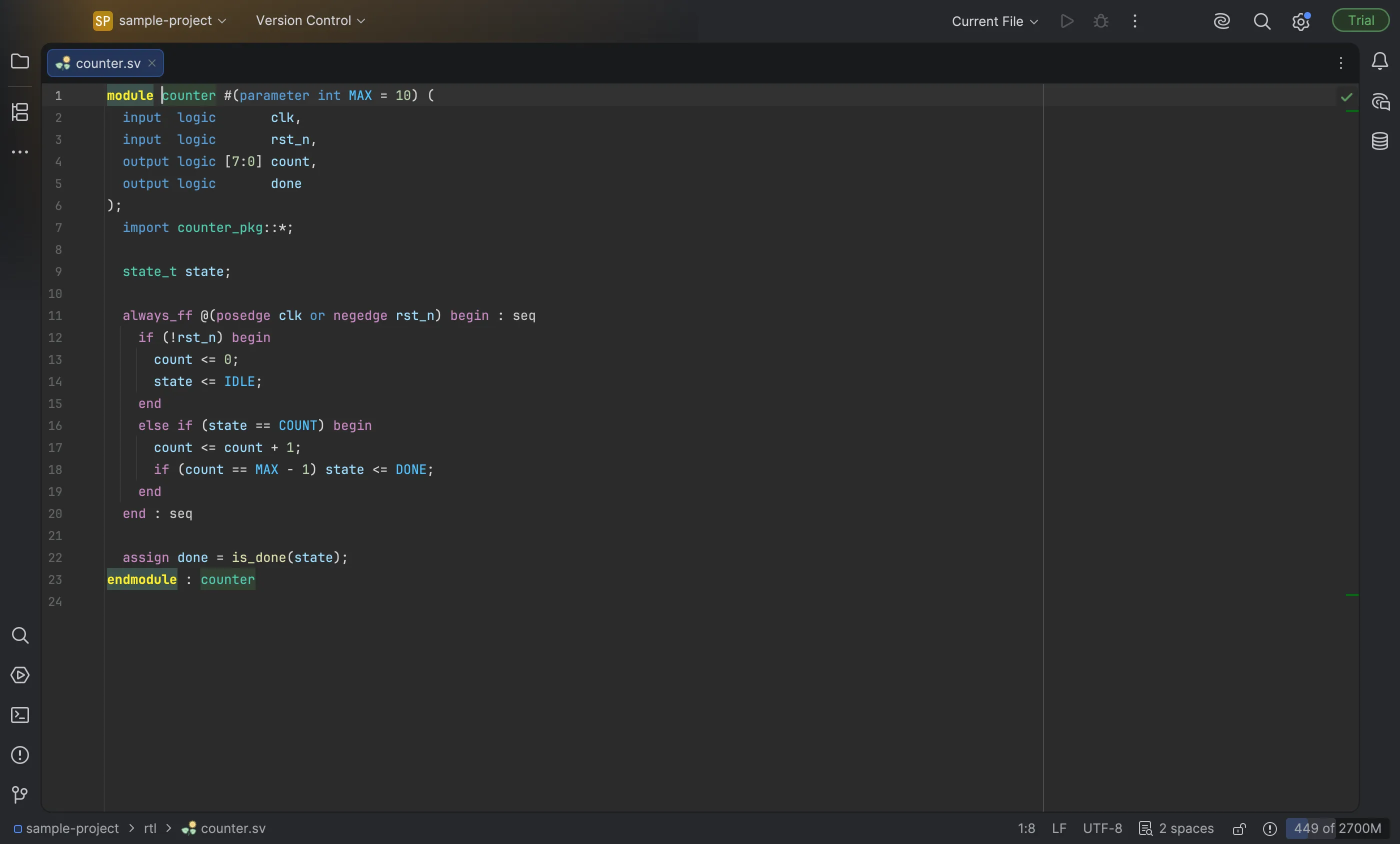
| Module, interface, program, package | counter in module counter and in counter u1(...); counter_pkg in import counter_pkg::*; |
| Class | shape in class shape, extends shape, shape s; |
| Type | state_t (typedef), type parameters, modports |
| Function or task declaration | is_done in function logic is_done(...); build_phase in an out-of-block function void my_drv::build_phase(...) |
| Function or task call | is_done(state), s.area(), super.build_phase(phase), uvm_config_db#(int)::get(...) |
| Port | clk in the port list and in the module body |
| Parameter | MAX in parameter int MAX = 10 and where it is used |
| Enum member | IDLE |
| Class property or struct field | side in real side; and in side * side |
| Variable, net or genvar | state in state_t state; |
| Function or task argument | s in is_done(state_t s) |
| Instance or clocking block | u_counter |
| Label | seq in begin : seq and end : seq |
A name that cannot be resolved keeps the plain text color, except in positions where its role is clear:
- a type (
extends uvm_driver) or class prefix (uvm_config_db#(int)::) is colored as a class, - a call (
f(...),obj.f(...),C::f(...)) as a function call, - a package in
import uvm_pkg::*;as a package, - the module name of an instantiation as a module.
That way UVM code keeps its colors even when the UVM library is not in the project. Named connections to an
unknown module (.clk(clk)) are not colored as calls.
Limitations
Section titled “Limitations”- In a hierarchical path that starts at a top-level module name (
top.u_sub.cnt), the first name keeps the plain text color (see Known limitations). - Names inside macro arguments are not colored.
- Words that became keywords in IEEE 1800-2009 and later (
soft,weak,global, …) get the keyword color even in older Verilog files that use them as names. - Names of properties and sequences are not colored yet.
SystemVerilog Studio color schemes
Section titled “SystemVerilog Studio color schemes”The plugin includes two editor color schemes in the style of popular VS Code themes. Related groups share a color family:
| Group | Dark | Light |
|---|---|---|
Design unit keywords (module, class, …) |
gold | dark gold |
| Control flow and process keywords, macros | purple | purple |
| Declaration, data type and modifier keywords | blue | blue |
| Module, class and type names | teal | teal |
| Functions and system tasks | yellow | brown |
| Ports, variables, properties, arguments, instances | light blue | dark blue |
| Parameters and enum members | bright blue | medium blue |
| Strings, numbers, comments | orange, light green, green | red, green, green |
| Inactive code | grey | light grey |
| Scheme | Based on |
|---|---|
| SystemVerilog Studio Dark | Darcula |
| SystemVerilog Studio Light | the default light scheme |
Select one in Settings | Editor | Color Scheme with the Scheme drop-down. They only set the SystemVerilog colors; everything else (other languages, the editor background, the rest of the IDE) comes from the base scheme.
Changing the colors
Section titled “Changing the colors”Open Settings | Editor | Color Scheme | SystemVerilog. Every group above is listed there, with a preview. By default the colors follow your IDE theme’s standard categories (keyword, function, constant, field, …); module, class and type names and ports have their own colors in the light and dark themes.
Try it
Section titled “Try it”- Open
rtl/counter.svfrom the sample project. Compare these names, which all have different colors: the module namecounter, the parameterMAX, the portclk, the typestate_t, the variablestate, the enum memberIDLE, the function callis_doneand the labelseq. - Open Settings | Editor | Color Scheme | SystemVerilog. The preview shows every color group.
- In Settings | Editor | Color Scheme, choose SystemVerilog Studio Dark (or Light) in the Scheme
drop-down and click Apply. In
rtl/counter.sv,if,beginandalways_ffare now purple andlogic,inputblue andmodulegold. Switch back to your previous scheme afterwards. - Select Names › Port, change the foreground color and click Apply. In
rtl/counter.sv,clk,rst_n,countanddonechange color. Restore the color with ⚙ | Restore Defaults or by resetting it.